On this page
article
2.2.2 Authentication & Authorization
Use the provided token to authenticate your requests.
API url
https://public-gateway.dandythrust.com/graphql
Set headers
You need to set x-api-token in your headers
{"x-api-token": YOUR_X_API_TOKEN}
Request Body Format
The request body format is application/json and includes two fields:
- query: The GraphQL query string.
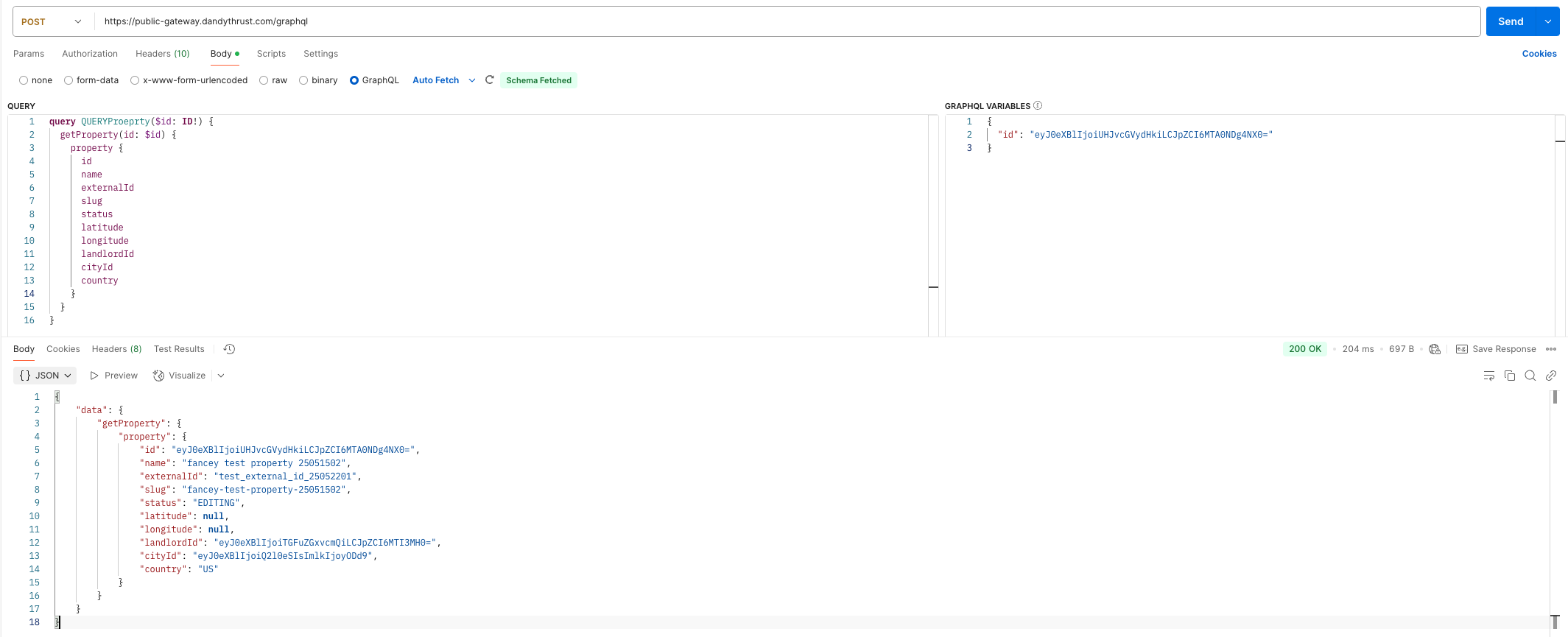
Example: A query GetProperty that retrieves property information using the variable $id.
  QUERY
query GetProperty($id: ID!) {
  getProperty(id: $id) {
    property {
      id
      name
      externalId
      slug
      status
      latitude
      longitude
      landlordId
      cityId
      country
    }
  }
}
- variables: Used to pass GraphQL Variables.
Example: The value of id is “eyJ0eXBlIjoiUHJvcGVydHkiLCJpZCI6MTA0NDg4NX0=”.
  {
  "id": "eyJ0eXBlIjoiUHJvcGVydHkiLCJpZCI6MTA0NDg4NX0="
}
Example is as follows
Common Unauthorized Error
| Error Message | Description |
|---|---|
| invalid x-api-token | Missing or invalid x-api-token Unable to authenticate the request because the x-api-token is either missing or invalid |
| permission rule cannot execute invalid args | Failed to decrypt the provided code Unable to execute the operation because the provided code is invalid or cannot be decrypted |
| permission rule cannot execute with invalid role id | The PMS user does not have permission to operate by the specified landlord Unable to execute the operation because the PMS user’s role does not grant permission for the specified landlord |
| permission rule cannot execute with invalid id | The target object does not exist Unable to execute the operation because the specified target object could not be found |